왜, 다시 해보려는지 이해가 가는 하루 였습니다.
일전에 phpipam 을 계획적으로 만들어 보려구 구성도를 작성하였는데요.
구성도를 보여 줘도, 오후 내내 이놈과 씨름하여 완성하였답니다.
더미 데이터 인줄도 모르고 몇번을 돌렸는지 모르겠네요.
모듈 형태로 하는게 좋은건지 아닌지 모르겠네요.
하나 바꾸면 다 바꿔줘야 하는게, 어렵더라구요.
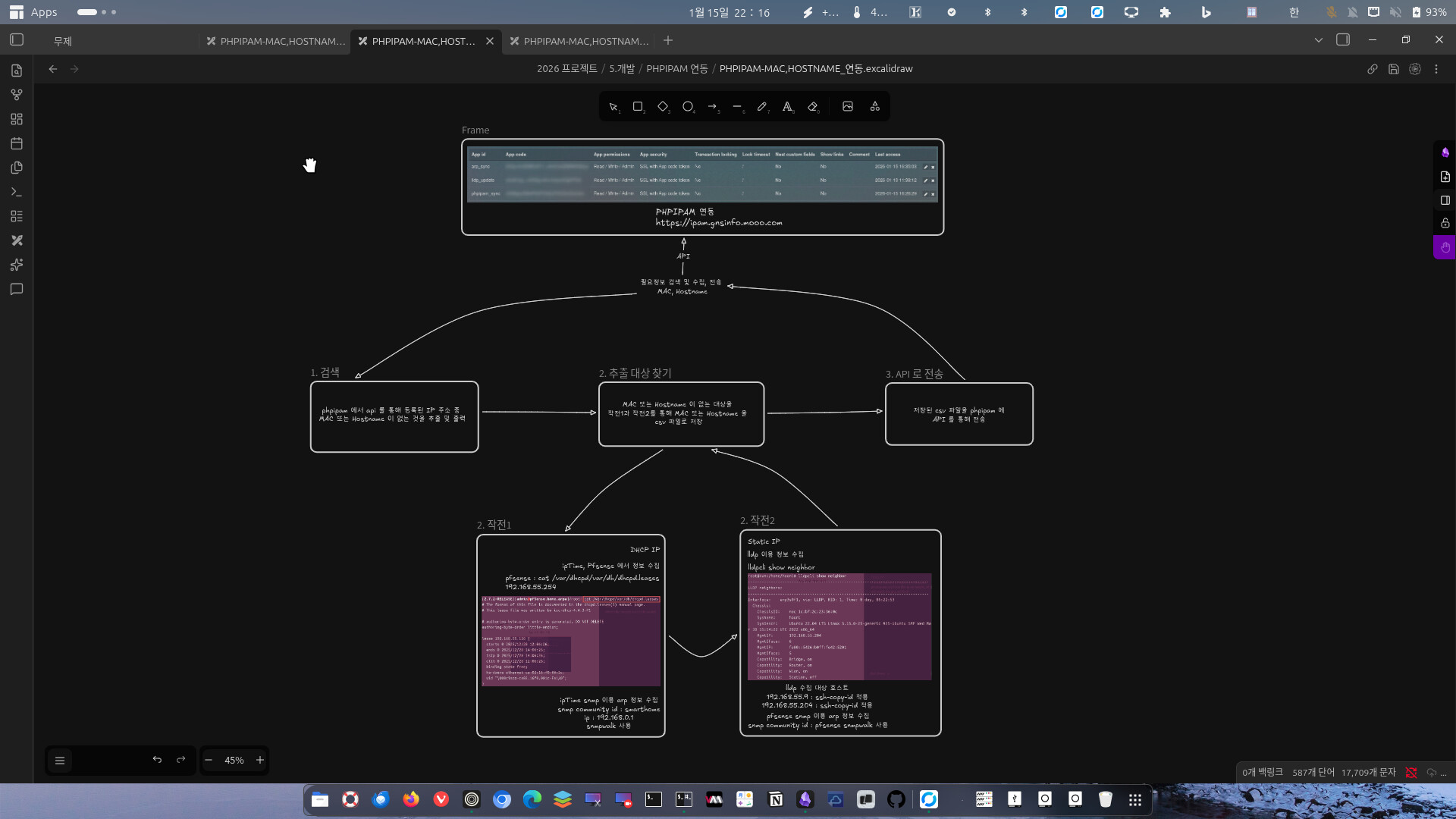
PHPIPAM + pfsense 연동: 네트워크 MAC 주소 및 호스트네임 자동 수집 자동화
0. 전체 프로세스 흐름도
전체 과정은 **Search(검색) → Collect(수집) → Sync(동기화)**의 3단계로 이루어집니다.
-
Search: PHPIPAM API를 조회하여 정보(MAC, Hostname)가 누락된 IP 추출
-
Collect: pfsense에 SSH로 접속하여
/var/dhcpd/var/db/dhcpd.leases파싱 -
Sync: 수집된 정보를 PHPIPAM API(PATCH)를 통해 최종 업데이트
1. 환경 설정 (config.yaml)
가장 먼저 각 서버의 접속 정보를 한곳에 관리합니다.
YAML
# PHPIPAM 설정
phpipam:
  url: "https://ipam.gnsinfo.mooo.com"
  app_id: "앱id"
  token: "xX8앱 코드uUwz"

# 업데이트 대상 서브넷 지정
target_subnets:
  - "192.168.55.0/24"
  - "192.168.0.0/24"

pfsense:
  host: "192.168.55.254"
  username: "admin"
  password: "패스워드"
# 수집 대상 설정
targets:
  iptime:
    ip: "192.168.0.1"
    community: "smarthome"
  pfsense:
    ip: "192.168.55.254"
    community: "pfsense"
    ssh_ip: "192.168.55.254"
  hosts:
    - "192.168.55.9"
    - "192.168.55.204"
2. 1단계: 누락된 IP 검색 (search_phpipam.py)
PHPIPAM에서 우리가 채워 넣어야 할 “숙제” 리스트를 가져오는 단계입니다.
Python
import requests
import yaml
import ipaddress
import pandas as pd
import urllib3

# SSL 경고 무시
urllib3.disable_warnings(urllib3.exceptions.InsecureRequestWarning)

def is_ip_in_subnets(ip, subnets):
    try:
        ip_obj = ipaddress.ip_address(ip)
        for subnet in subnets:
            if ip_obj in ipaddress.ip_network(subnet):
                return True
    except:
        return False
    return False

def run_search():
    with open("config.yaml") as f:
        config = yaml.safe_load(f)

    api_url = f"{config['phpipam']['url']}/api/{config['phpipam']['app_id']}"
    token = config['phpipam']['token']
    headers = {"token": token}
    target_subnets = config.get('target_subnets', [])

    print(f"--- PHPIPAM 검색 시작 ---")

    try:
        resp = requests.get(f"{api_url}/addresses/", headers=headers, verify=False)
        resp.raise_for_status()
        all_data = resp.json().get('data', [])

        print(f"서버에서 총 {len(all_data)}개의 IP를 발견했습니다.")

        targets = []
        for addr in all_data:
            ip = addr.get('ip')

            # [수정] None 데이터 방어 로직: 값이 없으면 빈 문자열로 대체 후 strip()
            mac = (addr.get('mac') or '').strip()
            hostname = (addr.get('hostname') or '').strip()

            # 서브넷 필터링
            if is_ip_in_subnets(ip, target_subnets):
                # MAC이 없거나, Hostname이 없거나, Hostname이 'unknown'인 경우
                if not mac or not hostname or hostname.lower() == 'unknown':
                    targets.append({
                        "id": addr.get('id'),
                        "ip": ip,
                        "current_mac": mac,
                        "current_hostname": hostname
                    })

        if targets:
            df = pd.DataFrame(targets)
            df.to_csv("targets_to_fix.csv", index=False)
            print(f"==> 검색 완료: 업데이트가 필요한 IP {len(targets)}개를 찾았습니다.")
        else:
            print("==> 업데이트할 대상이 없습니다.")

    except Exception as e:
        print(f"오류 발생: {e}")

if __name__ == "__main__":
    run_search()
3. 2단계: pfsense에서 정보 수집 (collect_data.py)
이제 진짜 정보를 찾으러 갈 차례입니다. pfsense의 DHCP 리스 파일에는 장비의 MAC과 이름이 들어있습니다.
Python
import pandas as pd
import re
import paramiko
import yaml
import urllib3

urllib3.disable_warnings(urllib3.exceptions.InsecureRequestWarning)

def get_pfsense_dhcp_leases(conf):
    """pfsense 서버에서 dhcpd.leases 파일을 읽어 파싱"""
    leases = {}
    client = paramiko.SSHClient()
    client.set_missing_host_key_policy(paramiko.AutoAddPolicy())

    try:
        # config.yaml 설정값 사용
        client.connect(
            hostname=conf['host'],
            username=conf['username'],
            password=conf['password'],
            timeout=10
        )

        stdin, stdout, stderr = client.exec_command("cat /var/dhcpd/var/db/dhcpd.leases")
        content = stdout.read().decode()

        # lease 블록 추출 (가장 최근 리스가 뒤에 오므로 dict로 덮어쓰면 최신 정보가 남음)
        lease_blocks = re.findall(r"lease ([\d\.]+) \{(.*?)\}", content, re.DOTALL)

        for ip, block in lease_blocks:
            mac_match = re.search(r"hardware ethernet ([:\w]+);", block)
            host_match = re.search(r'client-hostname "(.*?)";', block)

            mac = mac_match.group(1) if mac_match else None
            hostname = host_match.group(1) if host_match else None

            if mac:
                leases[ip] = {"mac": mac, "hostname": hostname}

    except Exception as e:
        print(f"pfsense 접속 실패: {e}")
    finally:
        client.close()
    return leases

def run_collect():
    # 1. 설정 로드
    with open("config.yaml") as f:
        config = yaml.safe_load(f)

    # 2. PHPIPAM 검색 결과 읽기
    try:
        targets_df = pd.read_csv("targets_to_fix.csv")
    except FileNotFoundError:
        print("targets_to_fix.csv가 없습니다. 검색(Step 1)을 먼저 실행하세요.")
        return

    # 3. pfsense에서 데이터 수집
    print(f"pfsense({config['pfsense']['host']})에서 DHCP 리스 정보를 수집 중...")
    pfsense_data = get_pfsense_dhcp_leases(config['pfsense'])

    collected_results = []
    for _, row in targets_df.iterrows():
        ip = row['ip']

        if ip in pfsense_data:
            info = pfsense_data[ip]
            real_mac = info['mac']
            # 이름이 없으면 자동 생성하여 빈칸 채우기
            real_host = info['hostname'] if info['hostname'] else f"host-{ip.replace('.', '-')}"

            print(f"  [발견] {ip} -> MAC: {real_mac}, Hostname: {real_host}")
            collected_results.append({
                "id": row['id'],
                "ip": ip,
                "mac": real_mac,
                "hostname": real_host
            })
        else:
            print(f"  [미발견] {ip} 정보가 리스 파일에 없습니다.")

    # 4. 최종 결과 저장
    if collected_results:
        pd.DataFrame(collected_results).to_csv("update_targets.csv", index=False)
        print(f"--- 수집 완료: update_targets.csv 생성 ({len(collected_results)}건) ---")
    else:
        print("업데이트할 새로운 정보가 수집되지 않았습니다.")

if __name__ == "__main__":
    run_collect()
4. 3단계: PHPIPAM 동기화 (sync_to_phpipam.py)
수집된 정보를 다시 PHPIPAM에 넣어줍니다. 이때 NaN 값을 빈 문자열로 처리하는 것이 포인트입니다.
Python
import pandas as pd
import requests
import yaml
import urllib3
import json

# SSL 경고 무시
urllib3.disable_warnings(urllib3.exceptions.InsecureRequestWarning)

def run_sync():
    try:
        with open("config.yaml") as f:
            config = yaml.safe_load(f)

        base_url = config['phpipam']['url'].rstrip('/')
        app_id = config['phpipam']['app_id']
        token = config['phpipam']['token']
        headers = {"token": token, "Content-Type": "application/json"}
    except Exception as e:
        print(f"설정 파일 로드 실패: {e}")
        return

    try:
        # [수정] fillna('')를 추가하여 비어있는 칸(NaN)을 빈 문자로 바꿉니다.
        df = pd.read_csv("update_targets.csv").fillna('')
    except FileNotFoundError:
        print("에러: update_targets.csv 파일이 없습니다.")
        return

    print(f"--- PHPIPAM 업데이트 전송 시작 (대상: {len(df)}건) ---")

    for _, row in df.iterrows():
        address_id = row['id']
        ip = row['ip']
        mac = str(row['mac']).strip()      # 문자열로 변환 및 공백 제거
        hostname = str(row['hostname']).strip()

        # [추가] 만약 MAC과 Hostname이 둘 다 비어있다면 업데이트할 필요가 없으므로 건너뜁니다.
        if not mac and not hostname:
            print(f" [건너뜀] {ip} -> 업데이트할 정보(MAC/Hostname)가 없습니다.")
            continue

        url = f"{base_url}/api/{app_id}/addresses/{address_id}/"
        payload = {"mac": mac, "hostname": hostname}

        try:
            resp = requests.patch(url, headers=headers, json=payload, verify=False)
            if resp.status_code == 200:
                print(f" [성공] {ip} 업데이트 완료 (MAC: {mac})")
            else:
                print(f" [실패] {ip} (코드: {resp.status_code}, 사유: {resp.text})")
        except Exception as e:
            print(f" [에러] {ip} 전송 중 예외 발생: {e}")

if __name__ == "__main__":
    run_sync()
5. 실행 및 결과 (main.sh)
이 모든 과정을 단 하나의 셸 스크립트로 실행합니다.
Bash
#!/bin/bash

# 가상환경 활성화 (venv 이름이 다르면 수정하세요)
source venv/bin/activate

echo "=============================================="
echo " PHPIPAM 정보 자동 동기화 프로세스 시작"
echo "=============================================="

# 1단계: PHPIPAM에서 업데이트가 필요한 IP 검색
echo "[Step 1/3] PHPIPAM 서버에서 대상 IP 검색 중..."
python3 search_phpipam.py

# search_phpipam.py가 생성한 targets_to_fix.csv 파일이 있는지 확인
if [ ! -f "targets_to_fix.csv" ]; then
    echo "업데이트할 대상이 없거나 오류가 발생했습니다. 종료합니다."
    exit 1
fi

# 2단계: 검색된 IP를 대상으로 실제 MAC 주소 및 Hostname 수집
echo ""
echo "[Step 2/3] 장비 접속 및 실제 정보(MAC/Hostname) 수집 중..."
python3 collect_data.py

# collect_data.py가 생성한 update_targets.csv 파일이 있는지 확인
if [ ! -f "update_targets.csv" ]; then
    echo "수집된 정보가 없습니다. 수집 단계를 확인하세요."
    exit 1
fi

# 3단계: 수집된 정보를 PHPIPAM 서버에 최종 전송
echo ""
echo "[Step 3/3] PHPIPAM 서버로 수집된 정보 전송 중..."
python3 sync_to_phpipam.py

echo ""
echo "=============================================="
echo " 모든 프로세스가 완료되었습니다."
echo "=============================================="